theSimCal · User Guide
thesimcal.com · Last updated July 2026

Your Control Panel at a Glance
When you sign in to theSimCal, you land on your Control Panel. Everything you can do lives in the menu on the left — this page shows you where.
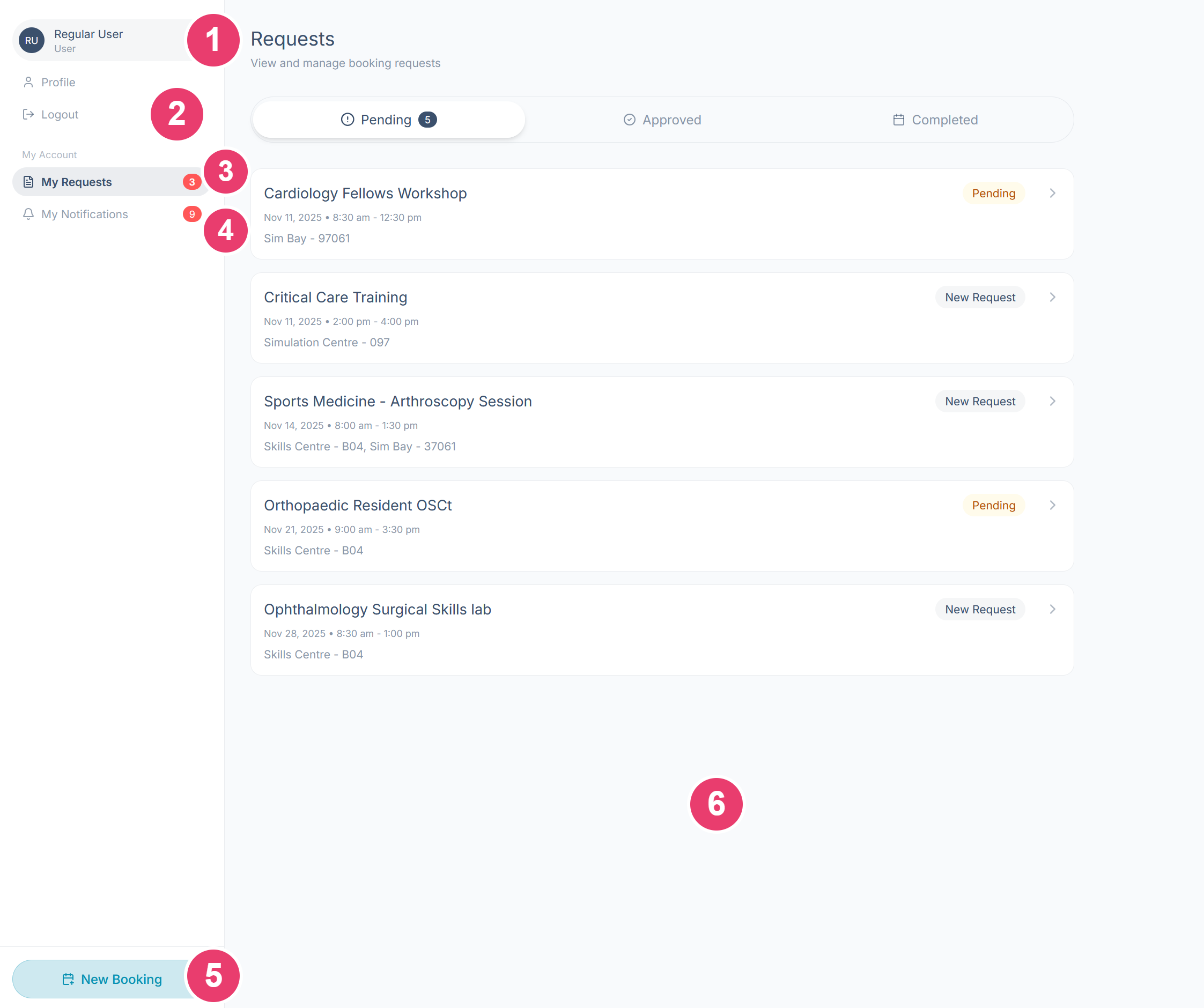
What each area does
1Account menu: Select your name to open or close the menu. Profile (your personal settings) and Logout live here.
2Logout: Signs you out of theSimCal. Always log out when you're on a shared computer.
3My Requests: Every booking request you've made, in Pending, Approved, and Completed tabs. The red badge counts your New Requests.
4My Notifications: Every update on your bookings — approvals, declines, messages, and edits. The red badge counts unread notifications.
5New Booking: Starts a new booking request.
6Main area: Whatever you select in the menu opens here — shown above: My Requests.
Where to go next
- New to theSimCal? Start with the ‘Creating an Account & Signing In’ guide.
- Ready to book a room? The ‘Submitting a Booking Request’ guide walks through every step of the New Booking process.
- Tracking a booking? The ‘Requests & Notifications’ guide covers statuses, editing a request, and your notifications.
- Updating your details or password? See the ‘Your Profile Settings’ guide.