theSimCal · User Guide
thesimcal.com · Last updated July 2026

Your Profile Settings
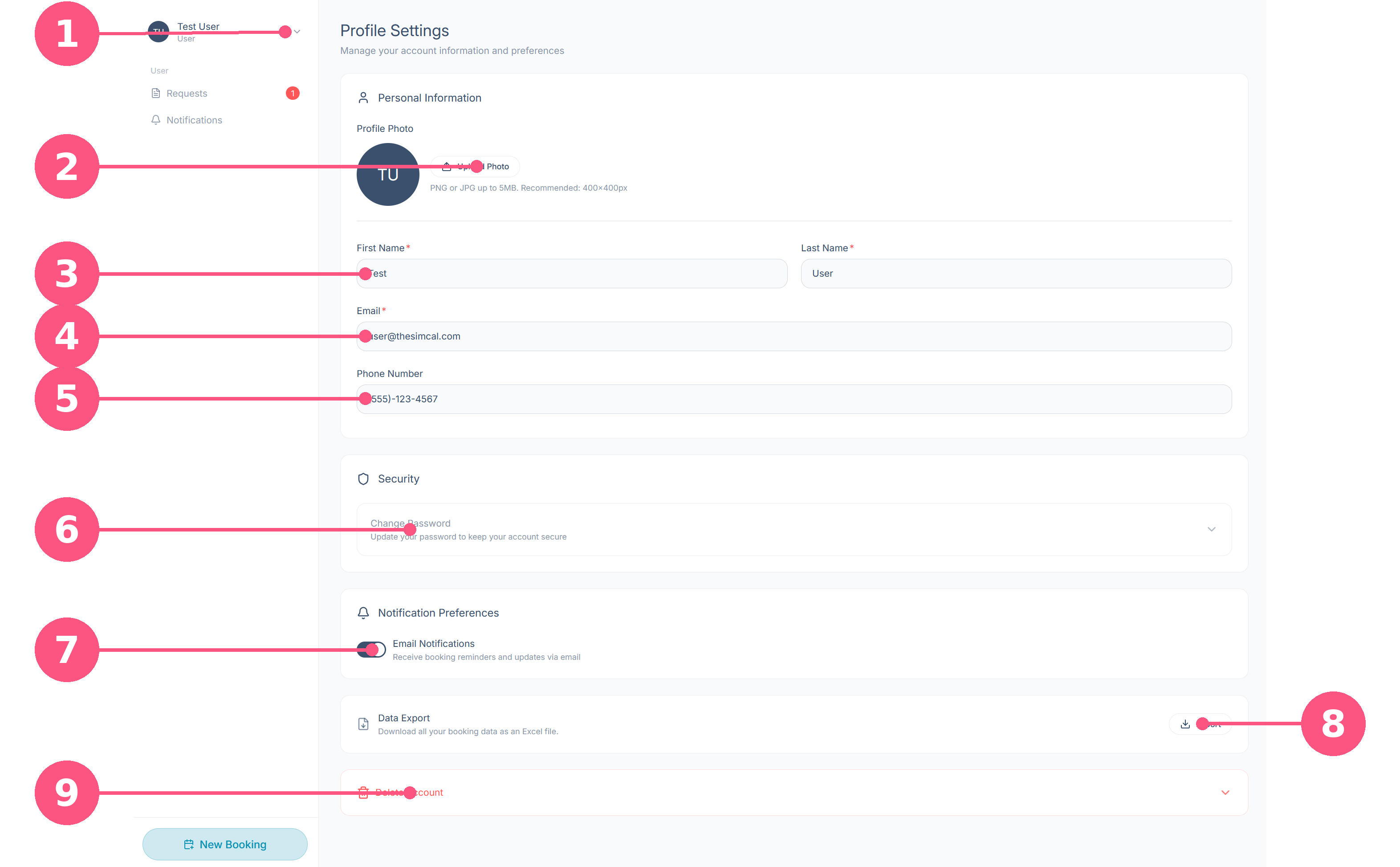
Profile Settings is where you manage your personal details, password, notifications, and data. Open it from the account menu by selecting the dropdown arrow next to your name in the top-left corner and choosing ‘Profile’ (badge 1 below).
What each area does
1Account menu: Select your name to open the menu where Profile Settings lives, and to log out.
2Profile photo: Upload a PNG or JPG (up to 5 MB; 400×400 px recommended). Until you add one, your initials are shown.
3First and last name: Your name as it appears on bookings and to your centre's administrators. Both are required.
4Email: Required. This is your sign-in address and where confirmations, reminders, and updates are sent.
5Phone number: Optional. A contact number your centre can reach you on about your sessions.
6Change password: Expand this panel to set a new password.
7Email notifications: Toggle booking reminders and updates on or off. Leave this on so you don't miss session reminders or changes to your requests.
8Data export: Select Export to download all your booking data as an Excel file, useful for your own records or reporting.
9Delete account: Expand to permanently remove your account.
Warning: Deleting your account is permanent and can't be undone. Export your booking data first if you want to keep a copy.
Good to know
- Saving your changes: when you edit any field, Save Changes and Cancel buttons appear. Select Save Changes to keep your edits, or Cancel to discard them.
- Required fields are marked with a red asterisk (*).
- Keeping your email current matters most — all confirmations and reminders go there.
- Logging out: the same account menu (badge 1) is where you log out — select the dropdown arrow next to your name, then ‘Logout’.